
All applications

SignatureIncluded from Starter

Get your documents signed online, no printer needed

Upload a contract, place the fields to fill in and send it. Your signers sign from their browser, and you get back a signed PDF with a certificate page.

Create my account

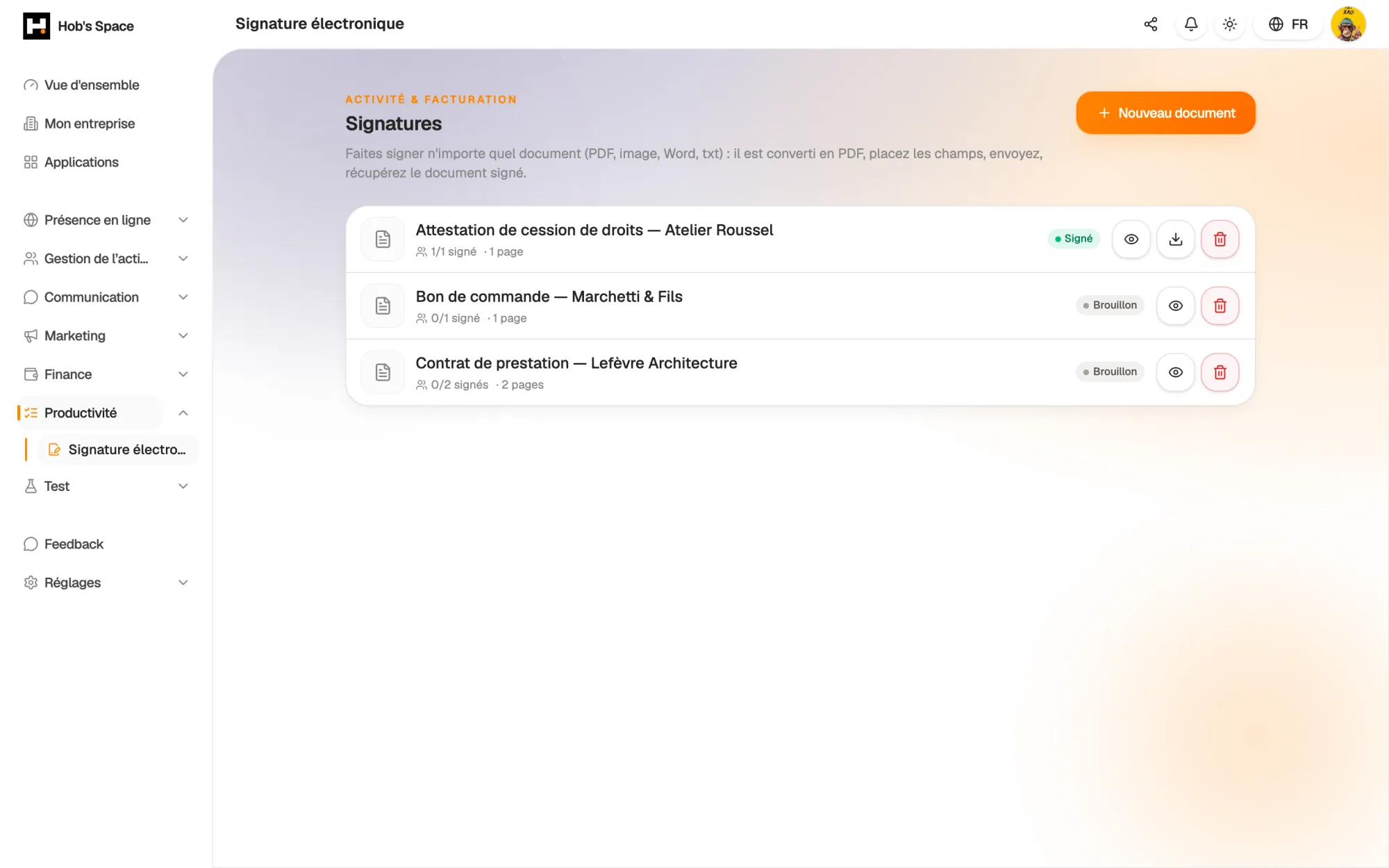
Your documents to sign, their signers and their status

Your documents to sign, their signers and their status

Upload

Start from the document you already have

Upload a PDF, a Word file (.docx), an image, a text file or an HTML page, up to 25 MB. Formats other than PDF are converted automatically: what gets signed is always a PDF.

Give the document a title and add a message for your signers. A digital fingerprint of the original file is calculated on upload: it will appear on the final certificate.

  • PDF, Word, images, text or HTML
  • Automatic conversion to PDF
  • Fingerprint of the original calculated on upload
hobs.space · signature
Contrat de prestation
Page 3/3
Signature
Signé
Nadia Boucher · 14 sept. 2024, 16:42
Horodaté et conforme eIDAS · valeur légale
Preparation

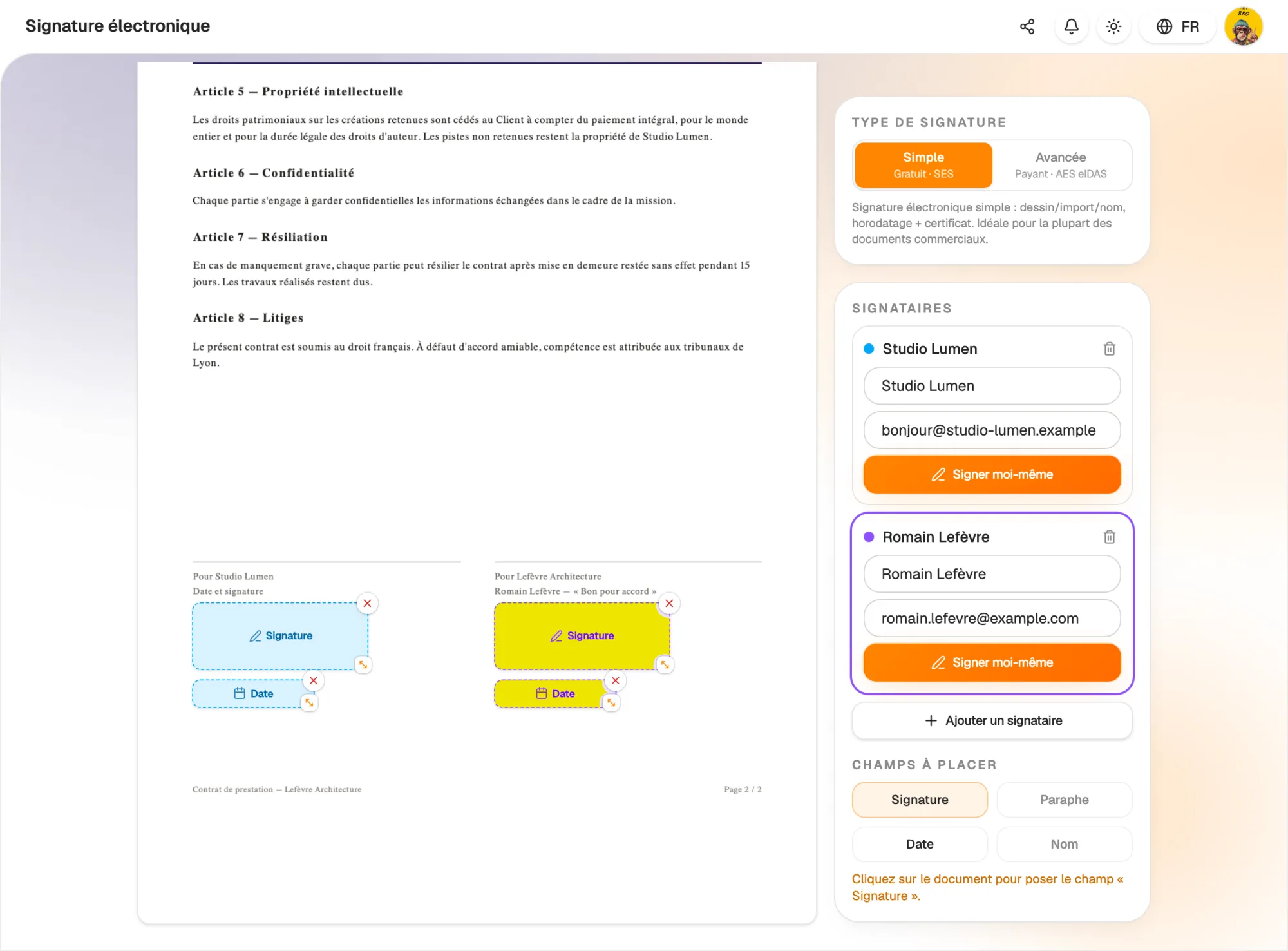
Place every field exactly where it belongs

Add your signers with their name and email, up to twenty per document. For each of them, drag the fields to fill in onto the pages: signature, initials, date or text, then adjust their position and size.

You can also pre-fill initials, a name or a date. Every signer needs at least one field: Hob's Space reminds you before sending, so no document goes out incomplete.

  • Signature, initials, date and text fields
  • Up to twenty signers per document
  • Field check before sending
Place every field exactly where it belongs

Signing

Your signers sign from their browser

Each signer receives an email with a personal link. They open the document, read it, then sign by drawing their signature, uploading an image or typing their name. No account is needed.

A signer can also decline and give a reason. You follow each person's progress: pending, viewed, signed or declined. You are notified as soon as everyone has signed.

  • Personal link sent by email
  • Drawn, uploaded or typed signature
  • Per-signer tracking: viewed, signed, declined
hobs.space · signature
Contrat de prestation
Page 3/3
Signature
Signé
Nadia Boucher · 14 sept. 2024, 16:42
Horodaté et conforme eIDAS · valeur légale
Evidence

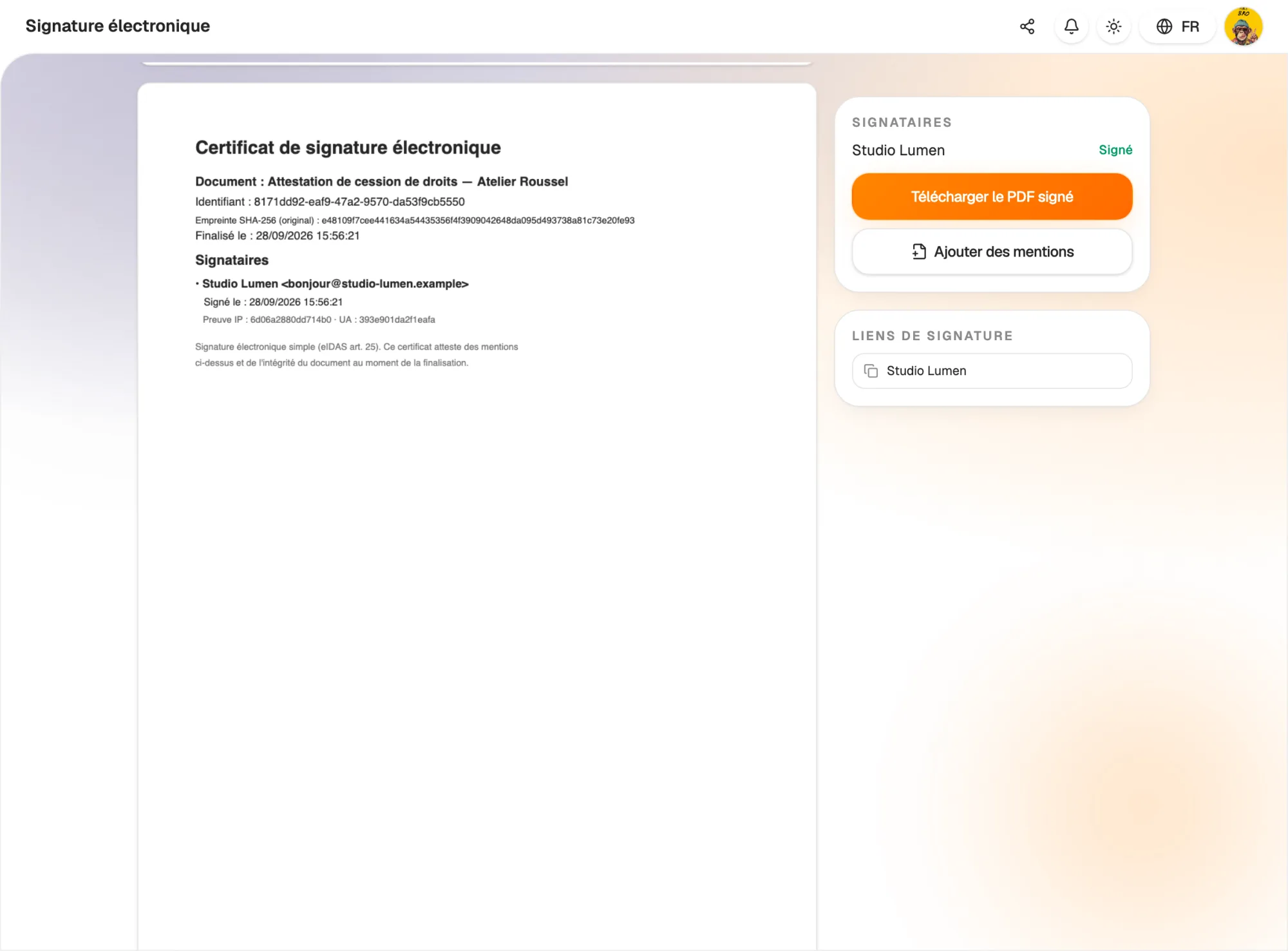
A signed PDF and its certificate

When the last signer has signed, Hob's Space assembles the final PDF: each field receives its signature, initials or date. A certificate page is added at the end of the document.

It shows the title, the document ID, the SHA-256 fingerprint of the original, the completion date and, for each signer, their name, email, signing time and technical connection evidence.

  • Downloadable signed PDF
  • Certificate page with SHA-256 fingerprint
  • Timestamp for every signature
A signed PDF and its certificate

Quotes and invoices

Get a quote or invoice signed in one click

From a quote or an invoice, the “Signature” button prepares the request for you: the PDF is generated, the client is added as a signer and a signature field is placed on the last page.

You check it, adjust if needed and send it. Your sales documents and your contracts are signed in the same place, with the same certificate.

  • Request prepared from a quote or invoice
  • Client added automatically as a signer
  • Signature field placed on the last page
hobs.space · signature
Contrat de prestation
Page 3/3
Signature
Signé
Nadia Boucher · 14 sept. 2024, 16:42
Horodaté et conforme eIDAS · valeur légale

And also…

  • Sign it yourself

    Add your own signature, before sending to others or without sending at all.

  • Saved signature

    Save your signature once and reuse it on your documents.

  • Later additions

    Add forgotten initials, a date or a name: the signed original stays archived.

  • Reasoned decline

    A signer can decline and explain why.

  • Notifications

    Get notified in Hob's Space when a document is signed or declined.

  • Built-in preview

    View each document and download the signed PDF from the list.

  • Cancellation

    Cancel a sent request as long as it is not completed.

  • Several companies

    Attach each document to the right company on the account.

Works with

Signature works with your quotes and invoices: a sales document becomes a signature request in one click, and your signed contracts are all kept in one place.

Frequently asked questions

Get started today.

Create your account and publish your first page in minutes.

Create my account